If you have ever admired the visual aesthetic of acclaimed cinematic productions — such as the cool, emerald-tinted shadows of a dystopian sci-fi world or the rich golden warmth of a sunset in a classic drama —, you have witnessed the transformative power of a LUT (Look-Up Table). Originally engineered by the motion picture industry to calibrate studio grading monitors and convert neutral camera sensor profiles into analog film stock aesthetics, this mathematical technology has become essential for photographers and digital creators.
However, many creators still confuse LUTs with generic social media photo filters. While common filters frequently apply rigid, destructive adjustments that degrade image fidelity, a LUT operates as a high-precision three-dimensional color matrix that remaps color coordinates pixel by pixel. In this comprehensive technical guide, we break down the mathematics of 1D and 3D LUTs, the internal anatomy of industry-standard .cube files, RGB color space interpolation algorithms, and how to apply and modulate LUTs inside PhotoEditor.sbs's Photo Filters tool with total privacy and client-side browser processing.
1. What Is a Look-Up Table: From Theory to Practice
In computer science, a Look-Up Table is an indexed data structure designed to replace computationally expensive run-time calculations with simple array lookups. Instead of evaluating complex logarithmic, trigonometric, or polynomial color equations billions of times per second across millions of pixels, the processor simply retrieves the precalculated output value stored in the table.
In digital photography and cinematography, a LUT acts as an exact translation dictionary informing the graphics engine: "whenever an input pixel has values R1, G1, B1, instantly replace it with output coordinates R2, G2, B2". This empowers creators to alter hue, saturation, and luminance across specific color bands simultaneously without disrupting other regions of the visible spectrum.
2. The Fundamental Difference: 1D LUTs vs. 3D LUTs
Not all look-up tables are constructed equally. Digital imaging standards categorize LUTs into two primary structural formats:
1D LUT (One-Dimensional)
Processes each color channel along an isolated, single-axis curve. It maintains three independent 256-entry tables for Red, Green, and Blue. While effective for setting gamma curves, overall brightness, and contrast thresholds, it cannot cross-reference channels. A 1D LUT cannot shift shadow hues toward teal while preserving warm midtone skin values without causing unwanted color contamination across the entire image.
3D LUT (Three-Dimensional)
Maps colors within a continuous three-dimensional volumetric lattice (an RGB color cube). Every node in the cube dynamically interacts with all three axes simultaneously. This unlocks sophisticated color grading possibilities: you can steer highlights toward soft warm gold, hold realistic human skin tones in the midtones, and push deep shadows into rich cinematic teal (the iconic Teal & Orange aesthetic).
3. RGB Color Cube Interpolation (Trilinear and Tetrahedral)
If a 3D LUT attempted to index every single discrete 8-bit RGB color combination ($256 \times 256 \times 256$), the file would require 16,777,216 coordinate rows, resulting in files dozens of megabytes in size. To optimize speed and storage, 3D LUTs sample the color space using a reduced lattice grid — standard resolutions include 17×17×17 (4,913 nodes), 33×33×33 (35,937 nodes), or 65×65×65 (274,625 nodes).
When an incoming pixel falls between neighboring sampling nodes in the lattice, the rendering pipeline computes its final output value using trilinear or tetrahedral interpolation:
- Trilinear Interpolation: Treats the surrounding lattice cell as a mini-cube defined by eight bounding vertices, weighting the input coordinate based on relative linear distance across the X, Y, and Z axes. It is computationally efficient and widely accelerated by modern browser engines and graphics hardware.
- Tetrahedral Interpolation: Divides each cubic sub-cell into six distinct tetrahedrons, identifying the specific tetrahedron enclosing the input point. This produces superior gradient transitions with reduced posterization artifacts under extreme contrast stretching.
4. Anatomy of the .cube Format: The Industry Standard
Originally developed by Adobe for seamless color grading exchange across post-production suites, the .cube file format is an open, human-readable ASCII text standard that has become the definitive market benchmark. Its structure is elegant and transparent:
# Example header and structure of a standard .cube file
TITLE "Vintage_Film_Emulation"
LUT_3D_SIZE 33
DOMAIN_MIN 0.0 0.0 0.0
DOMAIN_MAX 1.0 1.0 1.0

# Normalized mapped RGB output coordinates (range: 0.0 to 1.0)
0.0125 0.0089 0.0241
0.0412 0.0387 0.0519
0.0890 0.0762 0.0914
...
The metadata header declares the cube dimension (LUT_3D_SIZE 33 confirms the lattice contains $33^3 = 35,937$ coordinate entries). Every subsequent line defines the normalized floating-point RGB destination target for each incoming color node.
5. Cinematic Color Grading vs. Everyday Preset Filters
Understanding the distinction between cosmetic photo apps and genuine LUT-driven color science is vital for serious creative workflows:
- Generic Algorithmic Filters: Often apply arbitrary vignettes, synthetic grain, and heavy contrast curves that crush shadow textures and clip delicate highlight details indiscriminately.
- Cinematic 3D LUTs: Model physical camera sensor color science and chemical emulsions, honoring natural skin color fidelity while harmonizing scene lighting in line with historical cinema stocks.
- Intensity Blending: Professional colorists rarely apply LUTs at 100% full strength. The industry secret lies in dialing the opacity slider down between 40% and 70%, marrying the cinematic atmosphere with the raw natural realism of the original photograph.
6. Comparative Table: Color Mapping Architectures
Below is a technical comparison of primary color remapping technologies used across digital imaging:
| Mapping Architecture | Data Structure | Color Remapping Scope | Impact on Human Skin Tones |
|---|---|---|---|
| 1D LUT | 3 independent 256-entry tables (R, G, B) | Global contrast, gamma curves, and basic balance. | Limited; shadow adjustments tint facial skin tones inadvertently. |
| 3D LUT (.cube) | Volumetric RGB cube lattice (17³, 33³, or 65³) | Complete simultaneous control of hue, saturation, and luminance. | Exceptional; isolates and protects delicate skin hues with surgical precision. |
| Parametric Preset | Hardcoded application processing functions | Quick stylistic effects with rigid tonal flexibility. | Variable; frequently introduces harsh, unflattering color casts. |
| Manual RGB Curves | Independent spline/Bézier channel nodes | Infinite customization, but requires intensive manual calibration. | Requires advanced technical precision to avoid unnatural color shifts. |
7. Step-by-Step: Applying and Blending LUTs in PhotoEditor.sbs
PhotoEditor.sbs empowers you to apply curated visual styles and load external industry-standard .cube files directly within your browser, processing every pixel client-side without transmitting image data to remote servers:
Step 1: Open Your Image
Load your original high-resolution photo in the editor workspace. If your initial capture is noticeably under- or overexposed, balance baseline values first in the Adjust Photo panel.
Step 2: Access the Filters & LUTs Panel
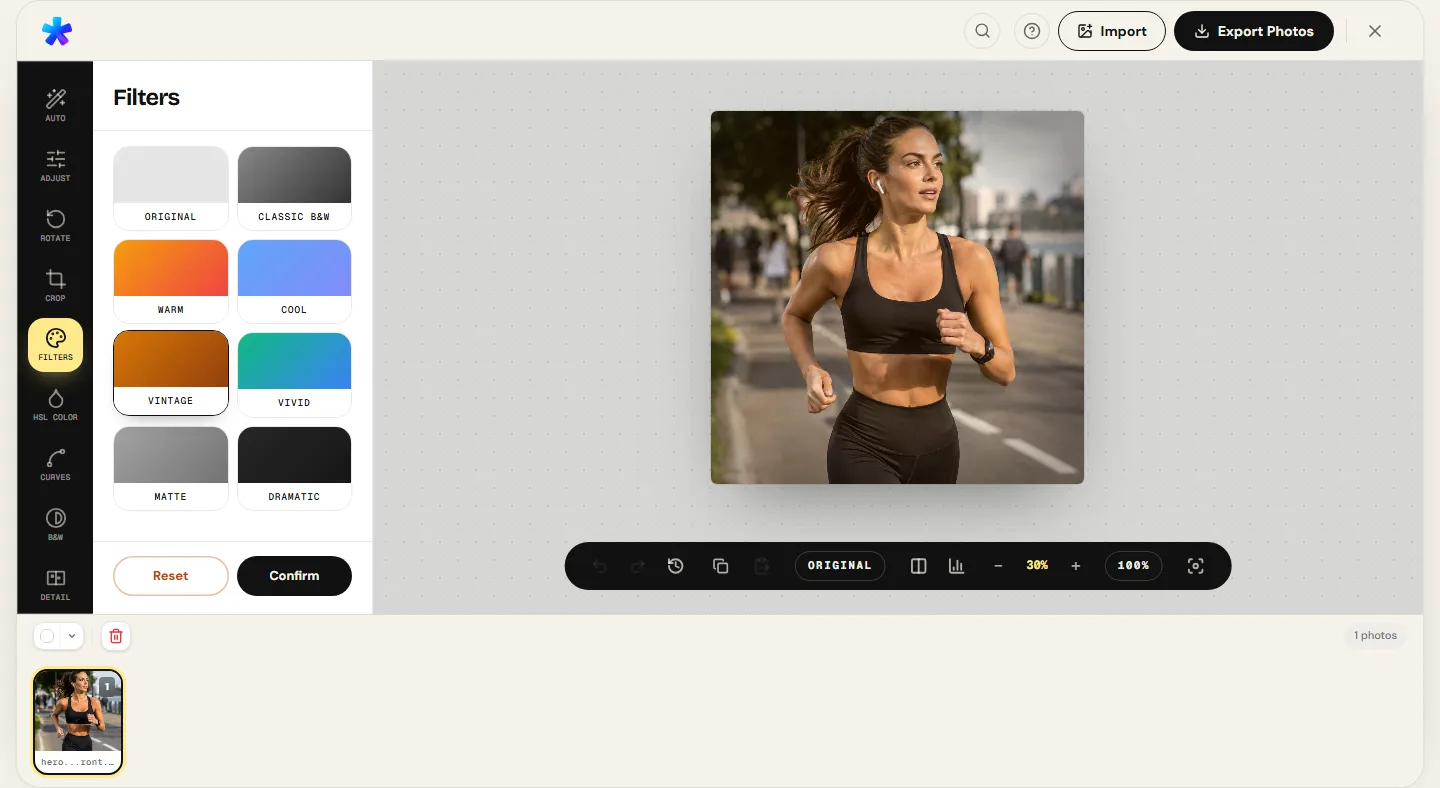
Open the Photo Filters tool. You will find a curated collection of cinematic presets — including Cinematic, Vintage, Analog B&W, and Warm Sunset —, alongside the option to import external .cube files.
Step 3: Select or Import Your LUT
Click your chosen preset or load your custom .cube file from your computer. The engine reads the color lattice and applies the 3D color transformation over your canvas in milliseconds.
Step 4: Modulate the Intensity Slider
Avoid harsh over-saturation by tuning the Intensity slider. Blending between the original photograph and the LUT-graded output at 50% to 70% consistently yields a polished, organic aesthetic.
Honest Technical Boundary Note
PhotoEditor.sbs is purpose-built to import, apply, and modulate existing industry-standard (.cube) LUTs with authentic color fidelity and complete user privacy. The editor does not author or create raw 3D color cube matrices from scratch — generating bespoke multi-axis calibration cubes requires specialized post-production grading suites like DaVinci Resolve.
Try Filters and LUTs in the Editor Now
Try Filters and LUTs in the Editor Now8. Frequently Asked Questions
Frequently asked questions
What does the acronym LUT stand for?
LUT stands for 'Look-Up Table'. In digital image processing, it is a precalculated mathematical reference matrix that maps incoming pixel color coordinates to transformed destination color values with maximum efficiency.
What is the difference between a LUT and a software preset?
A traditional software preset merely repositions standard adjustment sliders (such as contrast +15 or shadows -10). A 3D LUT fundamentally transforms coordinates across three-dimensional RGB color space, enabling complex tonal nuances that slider adjustments alone cannot achieve.
Can I use .cube LUTs designed for video on still photographs?
Yes. The .cube format is a universal color science standard independent of media format. If the LUT was authored for the standard sRGB or Rec.709 color space, it will perform identically on photographs and video frames.
Does PhotoEditor.sbs charge fees for importing or applying LUTs?
No. PhotoEditor.sbs is completely free. There are no subscription tiers, no hidden paywalls, and no watermarks placed on your exported photos.
Why did my photograph look oversaturated or broken when applying a LUT?
This typically occurs when applying a LUT authored for flat logarithmic camera profiles (Log) directly onto an already contrasty sRGB JPEG. To resolve this, lower the intensity slider to 30%–50% or ensure the photo has balanced exposure before applying the LUT.
Are my photos uploaded to a server when I import a LUT file?
No. All image processing and .cube file parsing take place 100% locally in your browser memory using Web Workers, ensuring absolute confidentiality and data security.
Can I export full-resolution images after color grading with a LUT?
Yes. You can export in maximum-quality JPEG (up to 100%) or uncompressed PNG, retaining original pixel resolution and fine structural details for print or digital distribution.
What output image formats are supported when saving my graded photos?
You can export your finished images in JPEG, PNG, or in WebP format when the browser supports Canvas WebP encoding.