Few technical defects undermine a photograph as immediately as a tilted horizon line. Whether across an expansive beachscape where ocean water seems to pour out of the frame, in an architectural skyline where skyscrapers appear on the verge of toppling over, or during an outdoor portrait with a destabilized background plane, an accidental tilt of merely 1.5 degrees is enough to shatter visual harmony and telegraph amateur technique to the viewer.
Straightening a crooked photograph is not simply a matter of arbitrary visual rotation. Rotating a two-dimensional raster pixel matrix involves Cartesian trigonometry, bilinear subpixel interpolation, and the geometric necessity of clipping blank wedge voids generated across the four corners of the rotated canvas. In this in-depth technical guide, we examine the vestibular-ocular perception of gravity in visual composition, mathematical rotation transformations, the difference between leveling camera roll versus perspective keystoning, and how to straighten images with sub-degree accuracy using the Rotate and Level tool on PhotoEditor.sbs, running 100% locally inside your browser.
1. Visual Psychophysics: Why Tilted Horizons Jar the Brain
Human physiology possesses a neurological equilibrium mechanism known as the vestibulo-ocular reflex. Semicircular canals in the inner ear continuously monitor Earth's gravitational vector, synchronizing ocular motor movements to keep our perceived visual horizon constantly aligned with physical gravity.
When an observer views a photograph where an ocean horizon or ground plane is tilted, the visual cortex experiences immediate cognitive dissonance between actual observer gravity and apparent scene gravity. Across seascapes, the reaction is especially jarring because basic fluid physics dictates that water at rest seeks a level plane. A sloping sea generates an instinctive subconscious sensation of falling and instability.
There are rare creative contexts where camera tilt is intentional — such as the dramatic Dutch angle, employed in cinematography to communicate psychological tension or disorientation. However, the Dutch angle operates at unmistakable angles between 25 and 45 degrees. A slight 1- or 2-degree tilt never reads as deliberate art; it reads universally as careless shooting or poor compositional discipline.
2. The Mathematics of 2D Cartesian Pixel Matrix Rotation
In digital graphics, an image is a discrete grid of coordinates (x, y). When applying a rotation by angle θ around a central origin (x0, y0), newly transformed coordinates (x', y') are computed via the classic 2D transformation matrix:
x' = (x - x0) × cos(θ) - (y - y0) × sin(θ) + x0 y' = (x - x0) × sin(θ) + (y - y0) × cos(θ) + y0However, calculating rotation "forward" (mapping every input source pixel into destination space) produces empty pinholes and gaps in the output raster, because rotated coordinates rarely land upon exact integer grid vertices. To resolve this, modern graphics pipelines employ inverse mapping coupled with bilinear interpolation:
The graphics engine steps through every destination pixel in the output canvas and calculates its corresponding source origin point by applying the inverse rotation matrix (using -θ). Because this coordinate falls between four neighboring subpixels, final color intensity is computed as a distance-weighted average, guaranteeing sharp contours free from stair-stepped aliasing.
In high-fidelity image processors, this subpixel reconstruction relies on bicubic or high-precision bilinear filtering. Rather than nearest-neighbor sampling — which creates broken diagonal lines and jagged pixel steps —, bilinear interpolation samples a 2×2 grid of adjacent pixels (four discrete values per RGB channel). Bicubic algorithms evaluate a broader 4×4 neighborhood of sixteen pixels using cubic polynomial weighting, preserving delicate high-frequency textures like hair strands, architectural brick mortar, and fine foliage during rotational shifts.
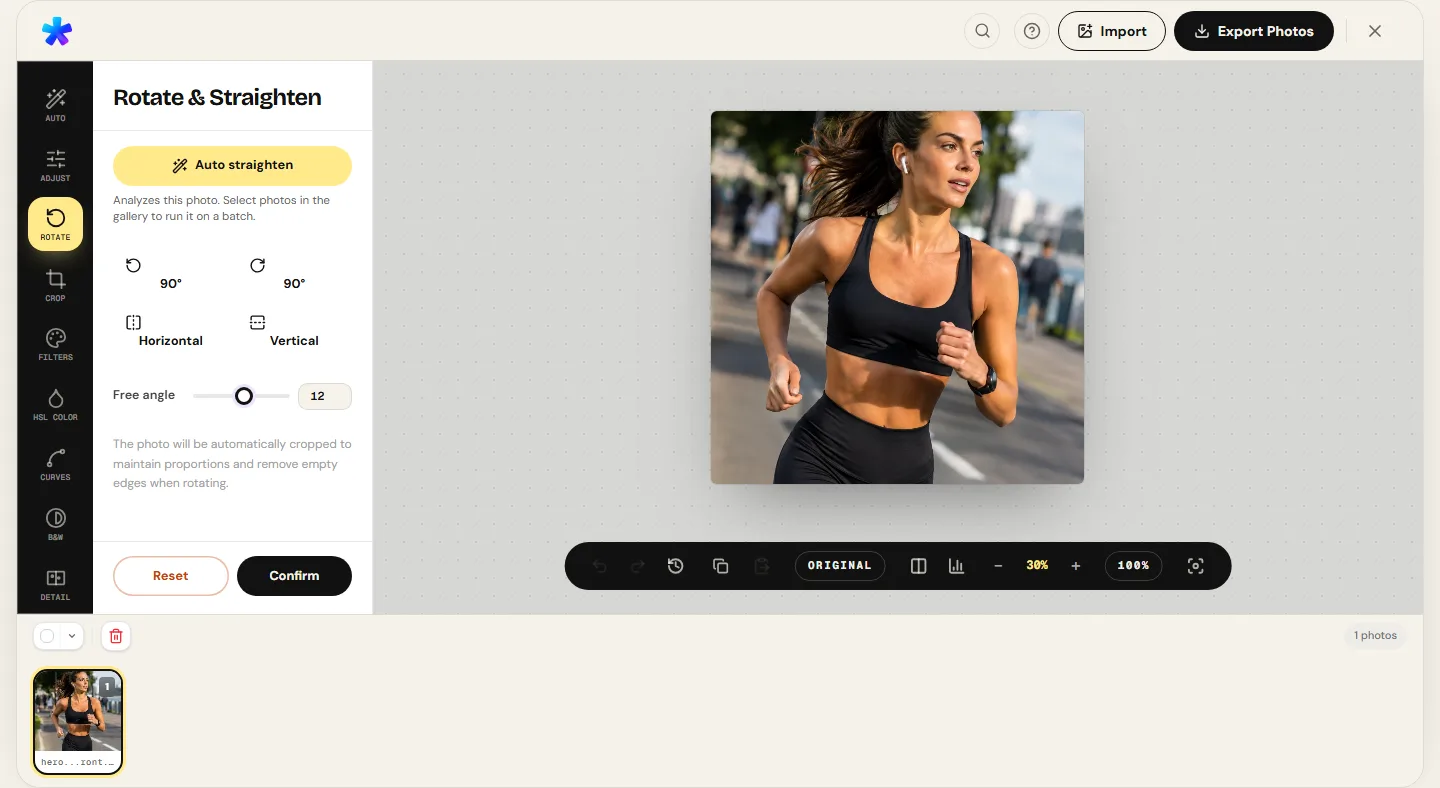
3. The Corner Void Dilemma and Maximum Inscribed Auto-Crop
Rotating a rectangular photo inside a fixed bounding frame introduces an unavoidable geometric consequence: as corners rotate outward, four blank triangular wedge voids (black or transparent) encroach upon the frame boundaries.
To eliminate these voids and return a clean rectangular deliverable, two approaches exist:
- Synthetic Margin Fill: Attempting to clone or mirror neighbor pixels into corner voids creates unnatural smudges and repetitive visual artifacts.
- Maximum Inscribed Rectangle Auto-Crop: The rigorous mathematical solution implemented by PhotoEditor.sbs analytically calculates the largest possible rectangle that can be inscribed inside the rotated matrix while preserving original aspect ratios (3:2, 4:3, or 16:9) without capturing any corner voids.
The mathematical formula defining the maximum inscribed width W_in as a function of original width W, height H, and tilt angle θ is expressed as:
W_in = W / (cos(θ) + (W / H) × sin(|θ|))This equation illustrates that even minor rotations between 2 and 3 degrees require trimming approximately 3% to 5% of peripheral edge pixels. Consequently, leaving slight compositional breathing room around key subjects in the field represents essential photographic technique.
4. Orthogonal 90-Degree Rotations and Horizontal Flips
Beyond sub-degree horizon leveling, rotation tools execute two other core photographic operations:
Orthogonal 90-Degree Stepping
Rotating an image by 90°, 180°, or 270° does not require trigonometric subpixel re-interpolation. Instead, pixel memory addresses are transposed directly across memory buffers (rows map cleanly into columns). PhotoEditor.sbs computes 90-degree turns in microseconds with zero mathematical sharpness loss, allowing you to reorient vertical captures misread by camera EXIF sensors.
Horizontal and Vertical Mirroring (Flips)
Flipping an image horizontally reverses the X-axis (x' = Width - x). This is widely used in commercial advertising to guide viewer gaze toward the natural left-to-right reading direction or align executive headshots with page typography.
5. Step-by-Step Workflow: Leveling Horizons in PhotoEditor.sbs
Straightening tilted horizon lines inside PhotoEditor.sbs is streamlined and precise:
Step 1: Load Your Source File
Open the Rotate and Level panel and upload your image (JPEG, PNG, or WebP).
Step 2: Align with the Compositional Grid
The editor projects an orthogonal alignment grid across the canvas. Identify a reliable horizontal or vertical benchmark: the distant sea horizon, architectural window frames, or floor seams.
Step 3: Dial in Sub-Degree Angles
Adjust the tilt slider in fine 0.1-degree increments until your visual benchmark runs strictly parallel with the overlay grid.
Step 4: Auto-Crop and Export
The engine applies the maximum inscribed containment crop automatically to eliminate blank corner voids. If you wish to reframe the composition further, hop into the Crop Photo panel to apply the Rule of Thirds before final export.
6. Comparative Tolerance Table Across Photo Genres
The table below summarizes recommended visual alignment tolerances and benchmark guides across primary photography genres:
| Photography Genre | Primary Benchmark Line | Visual Deviation Tolerance | Perceptual Impact if Left Uncorrected |
|---|---|---|---|
| Seascapes & Beach Panoramas | Ocean horizon line meeting the open sky | Extremely strict (acceptable deviation < 0.2°) | Apparent water slope; immediate subconscious viewer discomfort. |
| Urban & Architectural | Central building columns and window mullions | High (< 0.5° across optical center) | Skyscrapers appear structurally unstable or about to collapse. |
| Art & Document Reproduction | Document borders and canvas stretcher frames | Strict mathematical precision (< 0.1°) | Asymmetrical catalog display and OCR text recognition failure. |
| Drone & Aerial Photography | Distant flat terrain horizons or highway tangents | Moderate (< 0.8°) | Loss of scale and feeling of aircraft instability. |
| Environmental Portraits | Vertical tree trunks or interior floor seams | Flexible (< 1.5°) | Subjects look off-balance with compromised posture. |
7. Technical Boundaries: Sensor Roll vs. Keystoning Correction
To preserve technical honesty, it is essential to distinguish between two distinct optical challenges that photographers often confuse:
What rotation leveling solves: Corrects physical camera roll at the moment of capture (when the photographer held the camera slightly tilted to the left or right). PhotoEditor.sbs performs this angular correction seamlessly across any degree.
What rotation CANNOT fix (Perspective Keystoning): When photographing a tall building by tilting your lens upward from street level, parallel vertical building lines converge toward a vanishing point at the top — an optical phenomenon termed keystoning or perspective convergence. Rectifying this issue requires dedicated optical tilt-shift lenses with mechanical shift knobs or 3D polygonal mesh warping, capabilities not present in PhotoEditor.sbs. Leveling will align the ground plane, but vertical walls will naturally converge upwards per the laws of three-dimensional optical perspective.
Straighten Photo Horizons Now
Straighten Photo Horizons Now8. Frequently Asked Questions
Frequently asked questions
Why does my image lose a small border margin when it is straightened?
When you rotate a rectangular matrix, its original corners swing outside the frame, creating empty wedge voids along the sides. The editor automatically applies a proportional inscribed containment crop to remove these empty gaps, delivering a clean image without black borders.
Does straightening a photo degrade native image sharpness?
Fractional sub-degree rotations require bilinear subpixel interpolation to recalculate pixel values. In PhotoEditor.sbs, the algorithm preserves color fidelity and edge micro-contrast without creating visible blur or pixel aliasing.
How can I tell if a reference line in my photo is truly level?
In seascape captures, water at rest provides nature's most perfect gravitational level. In urban settings, rely on central door frames and pillars, avoiding extreme lens corners where wide-angle barrel distortion can introduce slight curvature.
Can I rotate a photo 90 degrees without losing any image margins?
Yes. Orthogonal 90°, 180°, or 270° rotations simply transpose memory coordinates across buffers (width becomes height), requiring zero containment cropping with 100% of original pixels preserved.
Does PhotoEditor.sbs fix buildings that appear to taper toward the sky?
No. Tapering building lines (keystoning convergence) result from tilting the camera upward in 3D space. PhotoEditor.sbs corrects rotational roll along the 2D plane, but does not apply complex 3D anamorphic mesh distortion.
Are my photos uploaded to a cloud server during horizon leveling?
No. All trigonometric rotation algorithms and canvas resampling execute exclusively inside your device's RAM via hardware-accelerated Canvas 2D. Your files remain completely confidential.
Which editing step should come first: cropping or straightening?
Always straighten your photo first! If you crop before straightening, the subsequent containment crop enforced by the rotation will trim off critical elements you just carefully composed.
Which file formats are available to save leveled photos?
You can save your leveled photo in high-resolution JPEG and PNG, or through WEBP export when the browser supports canvas encoding.