Cropping a photo online may look like the most routine task in digital editing, but in photographic practice, it represents the most decisive and irreversible compositional intervention you can make. Defining a new bounding box does far more than discard unwanted edges: it recalibrates the image's center of visual gravity, resets its aspect ratio, and guides the viewer's gaze.
However, cropping extracts an immediate physical toll: discarded pixels never come back. If you crop half the width and half the height of a picture, you haven't lost 50% of your data — you have eliminated 75% of the total sensor area, converting a dense 24-megapixel file into a modest 6-megapixel image. Understanding composition theory, aspect ratio geometry, and print resolution limits is the definitive difference between surgical framing and an irreparably degraded photo.
In this comprehensive guide, we combine 70% universal optical principles, composition rules, and reproduction math with 30% private, client-side execution in PhotoEditor.sbs's Crop panel, which operates entirely inside your web browser without transmitting your photos to external cloud servers.
Cropping vs. resizing: the physics of digital images
A widespread misconception among hobbyists and content creators is using the terms cropping and resizing (resampling/scaling) interchangeably. From a computational and raster matrix perspective, they are completely contrary operations:
- Cropping: A selective spatial subtraction. You draw a bounding box within the two-dimensional pixel grid and permanently discard all external rows and columns. The intrinsic pixel density of the remaining image remains identical to what the camera sensor captured, but the effective field of view (FOV) narrows, mimicking a lens with a longer focal length.
- Resizing (Resampling): Preserves the complete visual scene while recalculating the luminosity and chromatic value of every pixel through mathematical interpolation algorithms (such as bilinear, bicubic, or Lanczos). When downsizing an image from 4000 × 3000 to 1920 × 1440, every subject remains visible, but with fewer total data points.
Understanding this difference is critical: when you crop first and subsequently display the output on a large monitor or produce a physical print, you force the remaining pixels to undergo substantial enlargement. The foundational golden rule of darkrooms and digital labs remains unchanged: frame with maximum care through the viewfinder to crop minimally in post-production.
Composition theory: rule of thirds, negative space, and lead room
Cropping should never be a desperate rescue mission for a crooked horizon; it is the purposeful refinement of visual hierarchy. Three classic compositional pillars govern an exceptional crop:
1. The Rule of Thirds and Power Points
Derived as a practical simplification of the classical Golden Ratio (~1.618), the Rule of Thirds divides the frame into nine equal sections using two equally spaced horizontal lines and two vertical lines. The four points where these lines intersect are known as power points or focal anchors.
Human eyes do not scan pictures uniformly; they jump in saccadic bursts toward areas of high contrast and clear edge transitions. Placing a horizon along the lower third accentuates cloud formations and skies; placing it along the upper third emphasizes textures in water, sand, or architectural pavements. In portraiture, positioning the dominant eye directly upon an upper intersection instantly injects energy and vitality, breaking the static monotony of amateur dead-center framing.
2. Negative Space and Visual Breathing Room
Inexperienced editors frequently make the mistake of cropping too tightly (*tight crop*), suffocating their subjects against the edges of the frame. Negative space — the uncluttered expanse of sky, muted water, or softly blurred background — is not wasted real estate; it is the visual oxygen that allows the focal point to command attention. In minimalist photography, negative space conveys serenity, stature, solitude, or editorial prestige.
3. Look Room and Directional Motion Vector (Lead Room)
If your subject is looking toward the right or if an athlete is running toward the right edge, the crop must afford ample open space in the direction of that gaze or movement. Truncating that trajectory by positioning the subject immediately flush with the boundary creates an uncomfortable psychological sensation of collision and claustrophobia. Supplying sufficient lead room establishes natural, comfortable visual momentum.
Portrait anatomy: safe cuts vs. forbidden joint amputations
Portrait composition adheres to strict anatomical conventions developed over centuries of classical portrait painting and cinematography. Because human cognition is hardwired to identify limbs and joints, cropping an image directly across an anatomical joint registers sub-perceptually as an artificial amputation.
| Anatomical Region | Crop Verdict | Technical Rationale & Visual Impact |
|---|---|---|
| Neck | Strictly Forbidden | Creates the jarring illusion of a 'floating severed head.' Tight headshots must include the collarbone or clip cleanly through the upper forehead. |
| Shoulders / Collarbones | Excellent (Classic Headshot) | The industry benchmark for executive profiles, LinkedIn avatars, and resumes. Anchors the chest firmly within the lower frame. |
| Elbows and Wrists | Forbidden on the joint | Trimming hands at the wrist bone looks accidental. Slice cleanly across the middle of the forearm or through the center of the biceps. |
| Waist / Mid-Torso | Safe with padding | Classic medium shot. Position the lower crop boundary slightly below the naval or across the pants pockets, avoiding the pelvic beltline. |
| Knees | Strictly Forbidden | Removes the body's apparent structural base, causing thighs to float without weight. A proper American cowboy shot cuts 3 to 4 inches above the knee. |
| Ankles and Feet | Forbidden on the joint | Cropping toes or heels destabilizes gravitational balance. Show the full footwear planted on the floor or cut mid-shin. |
| Crown of the Head | Permitted in tight close-ups | In dramatic, emotional close-ups, clipping the top hair boundary brings the subject's eyes closer to the viewer with zero discomfort. |
When preparing images for corporate resumes, portfolio bios, or professional social profiles, favor medium close-ups where the slope of the shoulders and collarbones forms a stable compositional triangle.
E-commerce product catalog standards and biometric ID cropping
In specialized commercial photography, subjective artistic framing yields to strict geometric tolerances: online catalog grids and official government identification documents.
1. E-Commerce and Marketplace Catalog Consistency
In digital stores, products are viewed inside modular grids. Inconsistent framing creates visual fatigue and perceived amateurism. Professional merchandise demands:
- Uniform 1:1 Square Ratio: Marketplaces universally standardize on 1:1 squares (ranging between 1200 × 1200 px and 2000 × 2000 px). This ensures bottles, wide shoe boxes, and apparel thumbnails coexist harmoniously.
- 10% to 15% Perimeter Padding: The product boundary should never kiss the edge of the crop. Leaving 10% to 15% uniform whitespace preserves breathing room and prevents promotional badges from obscuring product details.
- Synchronized Baseline Shadows: When cropping multiple footwear, cosmetic, or beverage items, ensure the contact shadow sits at the exact same horizontal height across the entire sequence.
2. Biometric Passport and Visa Cropping (ICAO Document 9303)
Travel documents and visa portals follow the International Civil Aviation Organization (ICAO Doc 9303) biometric standards. Automated passport e-gates rely on strict geometric parameters:
- 3:4 or 5:7 Proportions: Most nations require 35 × 45 mm physical prints (approximately 7:9 or 3:4 aspect ratio). US Visas require a 2 × 2 inch square format (51 × 51 mm, 1:1 ratio).
- 70% to 80% Head Height: The distance from the base of the chin to the top of the head crown must occupy between 70% and 80% of the total vertical frame height (31 to 36 mm on standard 35 × 45 mm prints).
- Eye Axis Alignment: The subject's eye line must sit between 50% and 60% from the bottom edge of the photo, facing directly forward with zero head tilt and perfectly balanced neutral lighting.
Digital crop vs. telephoto lenses: the optical physics of perspective
A widespread myth in photography claims that aggressively cropping in software is identical to shooting with a longer telephoto lens. Optical physics confirms that while fields of view match, perspective mechanics do not:
- Field of View Shrinks: Cropping the central 50% of a 50mm image produces the exact same framing and FOV as a 100mm lens.
- Perspective and Compression Depend on Distance: Photographic perspective (the relative size proportion between a person's nose and ears, or the apparent distance separating a model from distant hills) is governed strictly by camera-to-subject physical distance. If you photographed someone from two feet away with a 28mm wide lens, wide-angle facial distortion is already baked into the pixels; cropping the perimeter will not replicate the flattering compression of an 85mm portrait telephoto.
- Signal-to-Noise Ratio Degradation: Magnifying a tiny section captured at high ISO sensitivities (such as ISO 3200 or 6400) enlarges stochastic sensor noise, rendering grain chunky and eroding micro-contrast along edges.
Aspect ratio geometry: from 1:1 square to 16:9 cinematic
Aspect ratio denotes the mathematical relationship between the horizontal width and vertical height of an image, irrespective of its physical pixel resolution. A 1080 × 1080 pixel web image and a 4000 × 4000 pixel camera capture share the exact same 1:1 ratio.
The table below outlines standard ratios utilized across contemporary graphic design and digital platforms:
| Aspect Ratio | Orientation | Primary Use Cases | Screen Behavior |
|---|---|---|---|
| 1:1 (Square) | Symmetrical | Avatars, social profile pictures, e-commerce stores, product feeds | Naturally supports central symmetry. Occupies balanced, neutral space across both mobile and desktop screens. |
| 4:5 (or 8:10) | Vertical | Instagram vertical feed, fashion lookbooks, carousel slides | The golden ratio for smartphone consumption: occupies maximum vertical feed height without getting automatically clipped by the app. |
| 9:16 | Extreme Vertical | Instagram Stories, Reels, TikTok, YouTube Shorts, mobile lockscreens | Fills 100% of modern smartphone screens. Requires safe zones at the top and bottom to avoid UI icons and text overlays. |
| 3:2 (or 2:3) | Horizontal or Vertical | Native DSLR/mirrorless full-frame 35mm sensors, 4×6 and 8×12 inch photo prints | Timeless photographic proportion derived from 35mm film rolls. Balanced for sweeping landscapes and documentary photojournalism. |
| 4:3 (or 3:4) | Horizontal or Vertical | Micro Four Thirds sensors, iPads, native smartphone camera stills, PDF slide decks | Squarer than 3:2, offering greater vertical breadth for portraits and editorial tabletop product photography. |
| 16:9 | Horizontal Widescreen | YouTube thumbnails, video covers, widescreen presentations, televisions | Standard high-definition video proportion. Inadvisable for vertical portraits due to severe lateral trimming. |
The math of resolution and print fidelity limits (DPI)
Digital image resolution is dictated by total pixel dimensions. However, when transitioning from a screen to the physical world on fine-art paper or magazine stock, dots per inch (DPI) or pixels per inch (PPI) governs visual clarity.
The fundamental formula for determining print capability after cropping is:
Maximum Print Dimension (Inches) = Remaining Pixels ÷ Target DPI
For pristine exhibition prints viewed up close, the printing industry standard is 300 DPI. For large wall posters viewed from three feet away, 150 to 200 DPI remains visually sharp to the naked human eye.
| Remaining Dimensions After Crop | Total Megapixels (MP) | Max Print Size at 300 DPI | Digital Screen Suitability |
|---|---|---|---|
| 4000 × 3000 px | 12.0 MP | 13.3 × 10.0 in (A4 format) | Ideal for 4K Ultra HD displays (3840 × 2160) with abundant sharpness headroom. |
| 2400 × 1800 px | 4.3 MP | 8.0 × 6.0 in (Standard 6×8 inch print) | Ample resolution for website banners, Full HD hero sections, and social media carousels. |
| 1080 × 1350 px (4:5 Ratio) | 1.46 MP | 3.6 × 4.5 in (Small format card) | The exact native resolution of Instagram vertical posts. Never crop below this threshold for mobile feeds. |
| 800 × 600 px | 0.48 MP | 2.6 × 2.0 in (Thumbnail print) | Insufficient for fine-art printing; suitable exclusively for small website avatars or email badges. |
Crucial caution: Upscaling an image in software after an aggressive crop cannot resurrect lost optical details; it merely interpolates adjacent pixels, introducing soft edges and artifacts.
Step-by-step editor workflow: horizon leveling and local cropping
In PhotoEditor.sbs, the crop interface is built for speed and geometric accuracy. Because every adjustment executes inside your browser via local Canvas 2D and Web Workers, your personal photos never leave your device.
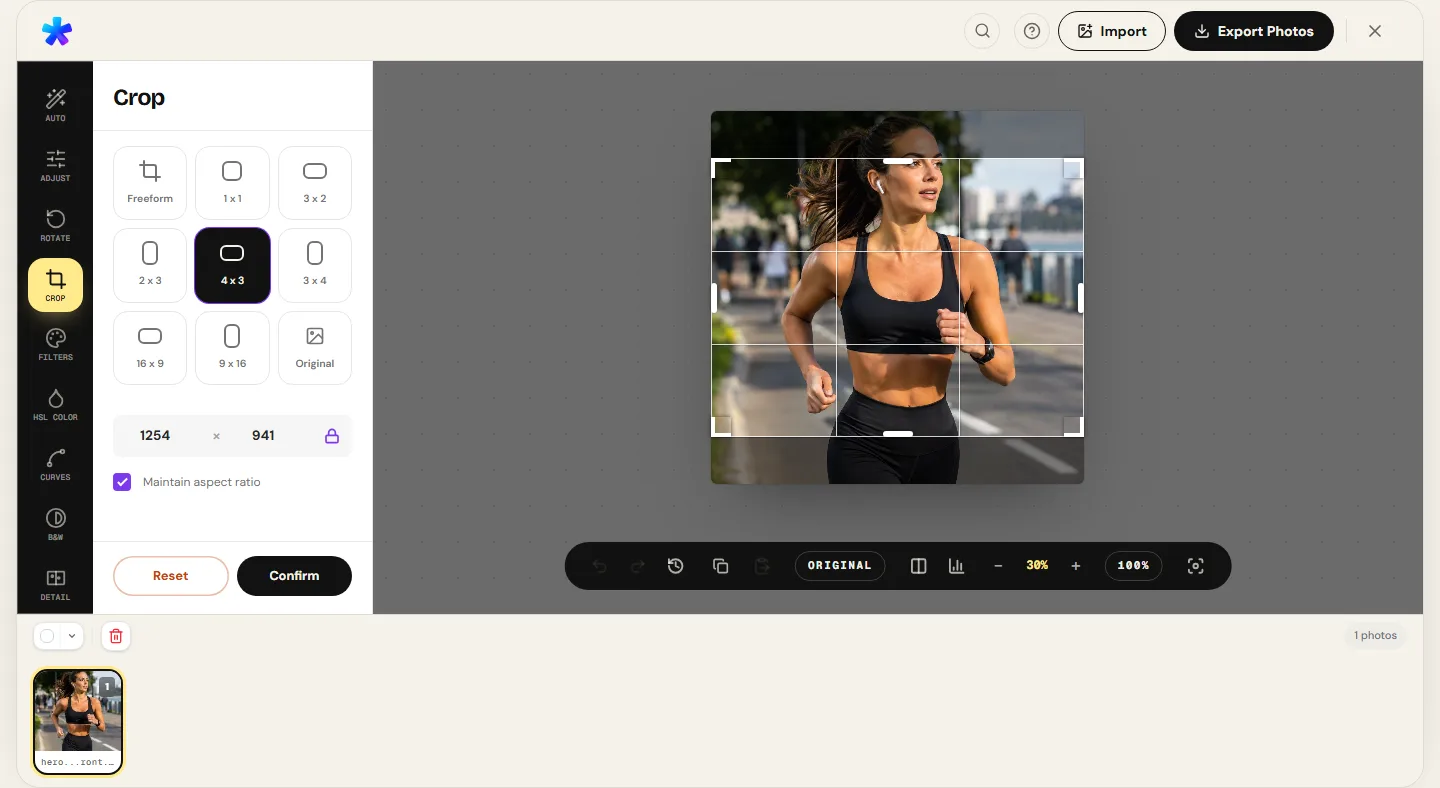
Recommended Editing Workflow:
- Level the Horizon Before Cropping: If the original capture has a slightly tilted horizon, open the Rotate panel first. Use the auto-straighten feature (calibrated for subtle shifts between 0.3° and 8°) or the free-angle slider from −180° to +180°. The editor automatically trims empty wedge corners resulting from rotation.
- Open the Crop Tool: Head to the Crop photo page. The browser engine directly decodes JPEG, PNG, WEBP, AVIF, iPhone HEIC files, TIFF, GIF, and BMP.
- Lock Your Target Aspect Ratio: Before dragging handles, select your ratio preset (1:1, 4:5, 3:2, 16:9, etc.). Locking your ratio prevents accidental non-standard dimensions that get clipped by social networks.
- Align Elements Using the Grid: As you drag the selection box, the rule-of-thirds grid overlays the photo. Align dominant eyes, product boundaries, or landscape horizon lines with the intersection anchors.
- Inspect at Full Zoom: Zoom out to check full-frame balance. Verify that no limbs are severed at joints and that lead room is balanced.
- Confirm the Crop: Click Confirm Crop. Note: in PhotoEditor.sbs, confirming a crop destructively updates the working memory copy to conserve browser RAM. Your original source file on disk remains completely untouched.
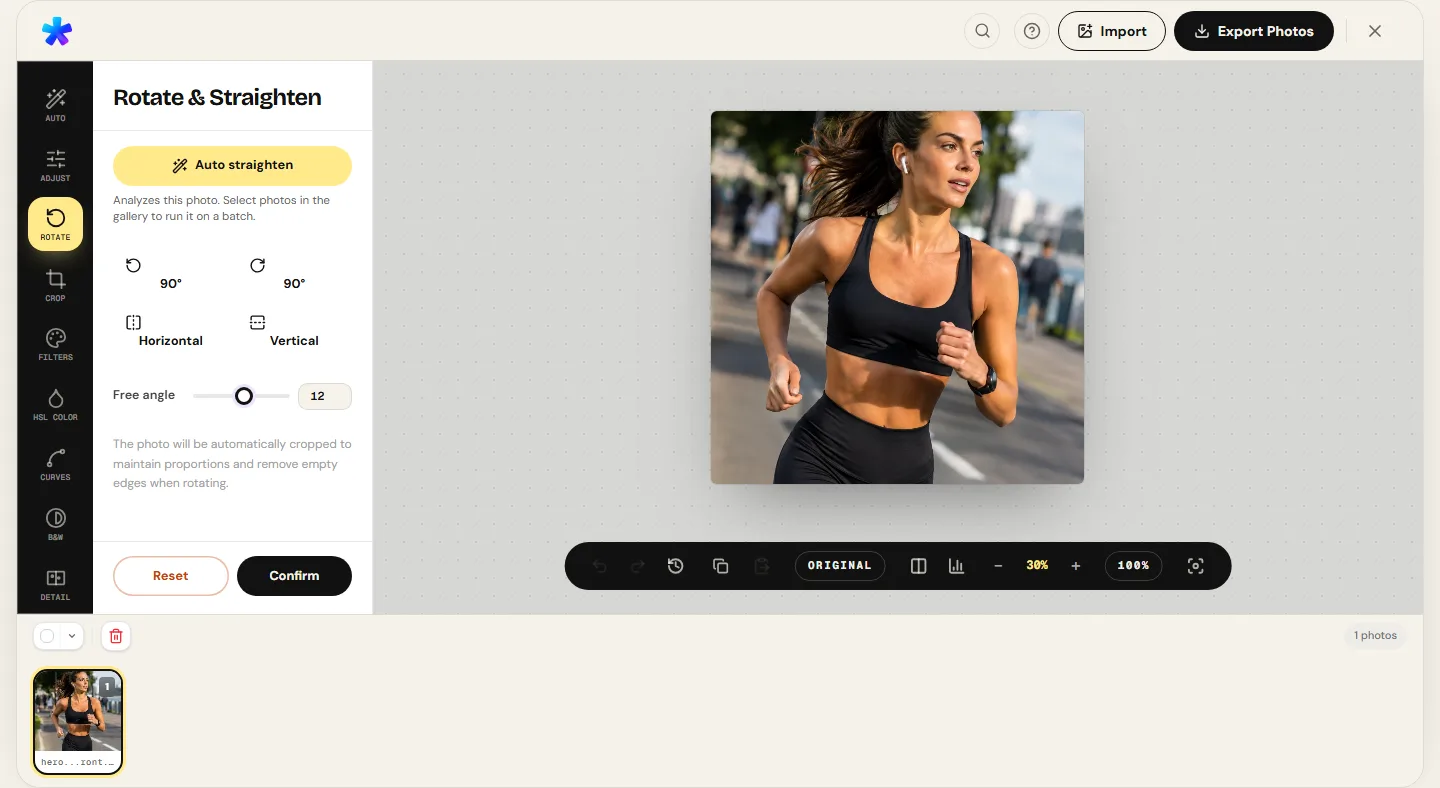
Exporting, color preservation, and keeping your original file safe
After locking in your framing and refining tones through the Curves tool or the HSL color panel, you are ready to export:
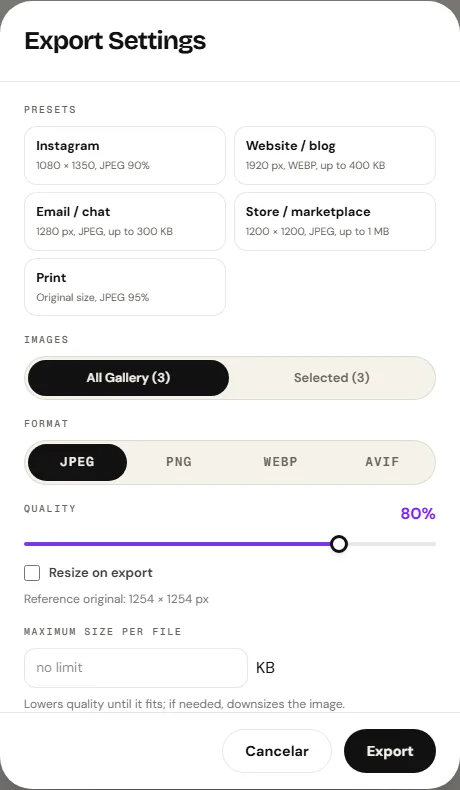
- Tailored Output Presets: The export modal provides instant profiles for Social Media (JPEG at 90% with target dimensions), Web/Blog (exporting to WEBP when the browser supports it, keeping sizes under 400 KB), and High-Fidelity Print (JPEG 95% or lossless PNG).
- EXIF Privacy Protection: By default, the export pipeline strips GPS coordinates, camera serial numbers, and capture timestamps. To clean metadata without modifying visual pixels, use our dedicated Remove photo metadata tool.
- Zero Overwrite Safety: The application never overwrites your original disk file. It downloads a pristine new copy into your browser's standard download folder.
Frequently asked questions
Does cropping reduce the sharpness of remaining pixels?
No. Cropping strictly deletes outer rows and columns. Every pixel that remains contains the exact optical and digital information captured by your camera. What diminishes is your headroom to enlarge the photo for large physical prints.
What happens to EXIF metadata after confirming a crop?
In PhotoEditor.sbs, the crop pipeline creates a new clean canvas matrix to optimize memory performance. Consequently, the exported cropped image does not retain the EXIF tags of the original file, safeguarding your location privacy.
Can I undo a crop after clicking Confirm?
Once confirmed in the toolbar, the active memory buffer discards the external pixels, and there is no single-step Undo for this action. However, your original file on your computer remains untouched; you can reload the original file at any time.
What is the ideal ratio so Instagram does not crop photos automatically?
The vertical 4:5 ratio (1080 px wide by 1350 px high) is optimal. It occupies maximum mobile viewport height without suffering automatic letterboxing or top-and-bottom cropping by the platform.
Does the editor automatically detect faces or crop batches using AI?
No. PhotoEditor.sbs does not use artificial intelligence, automated face detection, or cloud neural models. Every crop is manual and deterministic, ensuring artistic control, instantaneous performance, and private local processing.
How many megapixels remain if I crop a 24 MP photo by half?
If you reduce width by 50% and height by 50%, the remaining rectangle occupies 25% of the original surface area. Therefore, a 24 MP photo cropped in half results in a 6-megapixel final file.
Which format is best for exporting cropped images?
For general web sharing and social media, JPEG with 85% to 92% quality offers the best balance of file weight and visual quality. For modern lightweight websites, export to WEBP when the browser supports it for up to 30% smaller files.
How do I straighten a crooked horizon without losing key subjects?
Use the Rotate panel first to adjust the precise angle. The engine automatically applies the minimum bounding crop to trim transparent rotation wedges. Afterward, refine your framing in the Crop panel.