Choosing the right file format is one of the most critical decisions in modern digital photography. The right container guarantees an optimal balance between color accuracy, textural sharpness, web page loading speed, and disk storage consumption on mobile phones and laptops. However, the emergence of competing compression standards across recent decades — such as ubiquitous JPEG, Apple's HEIC, Google's WebP, and the recent open AVIF format — has introduced widespread confusion: which container provides the best image fidelity? Why do some iPhone photos fail to open on Windows PCs? Which format should you use for social media galleries and e-commerce listings?
In this comprehensive technical and comparative guide, we dissect the mathematics and physics of digital image compression, chroma subsampling structures, operating system and browser compatibility matrices, empirical benchmark measurements, and how to execute instant conversions in your browser via the Image Format Converter on PhotoEditor.sbs, running 100% locally with zero server file uploads and complete data privacy.
1. The Physics of Digital Compression: From DCT to Modern Codecs
An uncompressed 24-megapixel photograph (6000 × 4000 pixels) with three 8-bit RGB color channels occupies exactly 72 megabytes of raw uncompressed RAM (6000 × 4000 × 3 bytes). If every capture occupied 72 MB of local storage, camera memory cards would fill within dozens of shots, and loading a web photo gallery would burn gigabytes of cellular bandwidth in minutes.
To make the digital photography era viable, computer graphics engineering developed lossy compression algorithms. These algorithms do not discard data haphazardly; they exploit the psycho-optical limitations of the Human Visual System (HVS):
- Luminance vs. Chrominance Sensitivity: The human retina contains approximately 120 million rod cells (measuring brightness and monochrome luminance) and only 6 to 7 million cone cells (detecting red, green, and blue color wavelengths). Consequently, compression algorithms can discard substantial amounts of color data without human viewers perceiving an apparent loss in sharpness.
- High Spatial Frequencies: Human vision is acutely sensitive to subtle lighting gradients across broad areas (low spatial frequencies), but readily tolerates mathematical approximations across chaotic microscopic textures (high spatial frequencies).
2. Technical Anatomy: JPEG, HEIC, WebP, and AVIF
Each format tackles optical compression through distinct technological paradigms:
JPEG (Joint Photographic Experts Group, 1992)
The universal photographic benchmark. Partitions images into rigid 8×8 pixel blocks, computes the Discrete Cosine Transform (DCT), quantizes frequency coefficients, and encodes results with Huffman entropy coding. Under heavy compression, it exhibits visible block boundaries and mosquito noise along sharp edges.
WebP (Google, 2010)
Derived from VP8 intra-frame video compression. Utilizes spatial block prediction from adjacent neighbor pixels prior to transformation. Supports transparent alpha channels within lossy files and achieves 25% to 35% smaller file sizes than equivalent JPEGs at matched visual quality.
HEIC (MPEG / ISO, 2015)
Built upon the High Efficiency Video Coding (HEVC / H.265) intra-frame codec. Replaces rigid 8×8 blocks with dynamic quadtree partitions ranging from 4×4 to 64×64 pixels. Standard on Apple iPhones since iOS 11, doubling compression efficiency relative to legacy JPEG.
AVIF (Alliance for Open Media, 2019)
Leverages the open-source AV1 video codec. Features directional intra-prediction across 56 angles, native 10-bit and 12-bit HDR color spaces, and advanced in-loop restoration filtering. Delivers superior byte reduction, though demanding greater decoding compute power.
3. Chroma Subsampling (YCbCr) and Color Bit Depth
To understand why a 1 MB HEIC or AVIF file looks cleaner than a 1 MB JPEG, we must examine how color information is mapped inside digital matrix containers:
The YCbCr Color Space and 4:2:0 Subsampling
In all lossy compression engines, RGB pixel values are converted to the YCbCr color space, where Y represents Luminance (high-resolution grayscale brightness), Cb represents blue-difference chroma, and Cr represents red-difference chroma. Nearly all consumer JPEG files employ 4:2:0 subsampling, which halves chroma resolution both horizontally and vertically. A 2×2 grid of 4 pixels shares a single color sample, instantly slashing raw data weight by 50% prior to mathematical quantization.
Color Bit Depth: 8-Bit vs. 10-Bit Color
Legacy JPEG is strictly constrained to 8 bits per channel (256 discrete levels per RGB channel, totaling 16.7 million addressable colors). Across smooth gradients — such as an evening sunset or soft studio portrait backdrops —, stretching contrast on 8-bit files results in visible stepping bands (banding artifacts). Conversely, HEIC and AVIF support native 10-bit and 12-bit color depths (1024 to 4096 tonal levels, exceeding 1 billion colors), eliminating banding even under intense color grading.
4. Operating System and Browser Compatibility Matrix
The primary barrier to container adoption is never mathematical efficiency alone — it is universal device ecosystem compatibility:
- JPEG: 100% universal compatibility worldwide. Opens natively on every computer, smartphone, smart TV, photo kiosk, government portal, and web browser manufactured since 1992.
- HEIC: Seamless across Apple ecosystems (iPhone, iPad, Mac). On Windows PCs, it requires installing optional third-party codec packages for native Windows Explorer viewing. Many consular, visa, and employment portals reject
.heicuploads outright. - WebP: Over 97% global adoption across modern web browsers (Chrome, Firefox, Edge, Safari on iOS 14+ / macOS Big Sur+). It represents the industry standard for fast modern websites and online stores.
- AVIF: Supported across modern evergreen desktop and mobile browsers, but remains limited in legacy corporate desktop software and native email clients.
5. Empirical Benchmark Table: File Size vs. Fidelity
The table below compiles empirical compression measurements performed upon an identical 24-megapixel urban landscape capture (6000 × 4000 pixels):
| File Format | Color Bit Depth | Average Size (MB) | Savings vs. JPEG | Visual Fidelity & Common Artifacts |
|---|---|---|---|---|
| Original RAW / TIFF | 16-bit uncompressed | 72.0 MB | 0% (Baseline) | Absolute mathematical purity without loss or compression artifacts. |
| JPEG (Quality 85%) | 8 bits per channel | 2.4 MB | Baseline | Excellent center sharpness; subtle blockiness visible in homogeneous skies. |
| WebP (Quality 80%) | 8 bits per channel | 1.6 MB | -33% | Smooth tonal gradations without block tearing; clean high-contrast edges. |
| HEIC (Quality 80%) | 8 to 10 bits per channel | 1.2 MB | -50% | Exceptional retention of fine foliage textures at half the weight of legacy JPEG. |
| AVIF (Quality 65%) | 10 to 12 bits native | 1.1 MB | -54% | Smooth roll-off with complete absence of color banding across sunset gradients. |
6. Practical Decision Tree: Which Format to Pick for Every Use Case
To streamline your photographic workflow, apply these four practical guidelines based on your final delivery destination:
- For Client Delivery, Physical Printing, or Social Media: Choose JPEG. Social networks like Instagram recompress uploads through their own DCT pipelines. Delivering an sRGB JPEG at 88% to 92% quality guarantees seamless ingestion without format rejections.
- For Web Publishing, Blogs, and E-Commerce Galleries: Choose WebP. Leveraging WEBP export (when the browser supports it) cuts image payload weights by over 30%, speeding up Core Web Vitals and saving visitor mobile data bandwidth.
- For iPhone Storage Preservation: Retain HEIC. Setting your iOS camera to "High Efficiency" doubles device photo capacity compared to "Most Compatible" mode.
- When Web Forms or Windows Tools Reject HEIC: Convert to JPEG. Use client-side conversion to produce universally accepted JPEG files before submitting job applications or government visa forms.
7. Painless Local Conversion in PhotoEditor.sbs
When you have HEIC photos from your phone or WebP images needing conversion to standard JPEG, PhotoEditor.sbs delivers two structural advantages:
100% Client-Side Processing: Unlike traditional web converters that upload private personal photos to remote cloud servers — risking data retention, server outages, and bandwidth lag —, PhotoEditor.sbs decodes and encodes every image strictly inside your browser memory. Your files never leave your computer or phone.
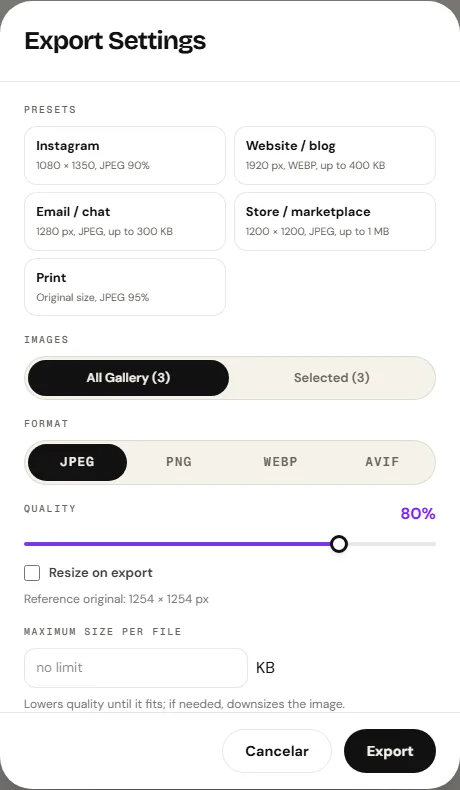
Granular Quality Controls: In our dedicated Convert Image Format tool or the export dialog of any workspace module, you can adjust quality compression percentages and target formats in seconds.
Open Image Format Converter
Open Image Format Converter8. Frequently Asked Questions
Frequently asked questions
Why won't my Windows PC open my iPhone's HEIC photo files?
HEIC relies on the patented HEVC video codec, which is not pre-installed by default on legacy Windows versions. To open these photos without paying for third-party extensions, convert them to universal JPEG using PhotoEditor.sbs.
Does WebP suffer from lower visual quality than legacy JPEG?
No. Thanks to spatial predictive macroblock encoding, WebP achieves equivalent or superior visual fidelity compared to JPEG while reducing file sizes by approximately 30%, eliminating blocky pixel artifacts.
Can I upload HEIC files directly to Instagram from my desktop?
While the mobile iOS Instagram app converts HEIC files on the fly during library selection, desktop browser uploads and social scheduling dashboards generally require standard JPEG or PNG files.
What is the difference between lossy and lossless image compression?
Lossy compression (JPEG, lossy WebP, HEIC) selectively discards imperceptible high-frequency visual details to shrink file weight. Lossless compression (PNG) preserves every single subpixel value mathematically, making it essential for screenshots and typography.
Why hasn't AVIF completely replaced JPEG everywhere yet?
Although AVIF delivers impressive compression efficiency and HDR support, encoding and decoding AV1 image frames requires significantly more CPU power than JPEG, and legacy software suites lack native support.
Does PhotoEditor.sbs retain copies of my uploaded images during conversion?
No. All format conversion executes locally inside browser memory via Canvas APIs and TypedArrays on your machine. Zero image pixels are transmitted across the internet.
What is the optimal JPEG quality setting for exporting web photos?
A quality setting between 85% and 90% delivers an ideal sweet spot of crisp visual clarity and compact file weight. Pushing past 95% multiplies file size with negligible visible gains.
How widely supported is the WebP image format across modern browsers?
All modern evergreen browsers (Google Chrome, Apple Safari, Mozilla Firefox, Microsoft Edge, Opera) feature native support for WEBP export when the browser supports canvas encoding.