When you snap a photograph using your smartphone or digital camera, the generated file stores far more than just visible raster pixels and color values. Silently and invisibly to the naked eye, the camera firmware embeds dozens of detailed technical metadata fields directly inside the file header. Included within this hidden payload are the exact geographic satellite coordinates of where you were standing (GPS latitude and longitude), the exact date and second the shutter tripped, the make and model of your smartphone, and even the camera sensor's unique factory serial number.
If you share that photograph via email, cloud drives, messaging platforms as an uncompressed document, or post it on classifieds and online marketplace portals, anyone with basic computer literacy can inspect those headers in seconds — uncovering your home address, your daily commute, or your family's routine. In this essential digital security guide, we explore EXIF, IPTC, and XMP metadata formats, evaluate real-world privacy risks, and demonstrate how to completely sanitize your images inside PhotoEditor.sbs's Remove Photo Metadata tool — running 100% locally and privately in your browser.
1. What Is Metadata: EXIF, IPTC, and XMP Explained
The term metadata translates literally to "data about data". In digital imaging, the tech industry relies on three primary standardized metadata frameworks:
- EXIF (Exchangeable Image File Format): Standardized by the Japan Electronics and Information Technology Industries Association (JEITA) in 1995, EXIF is the universal baseline automatically written into image headers by cameras and smartphones upon capture. It logs sensor parameters (ISO, aperture, shutter speed, focal length), lens model, camera orientation, and geolocation data from built-in GPS chips.
- IPTC (International Press Telecommunications Council): Formulated for photojournalism, wire services, and media syndicates. It houses textual captions, photographer copyright declarations, licensing agreements, and headline descriptions.
- XMP (Extensible Metadata Platform): An XML-based standard formulated by Adobe. It records granular revision histories, color labels, non-destructive editing instructions, and asset management tags created within professional software suites.
2. The Hidden X-Ray: GPS, Timestamps, and Serial Numbers
The most pressing privacy threat for everyday creators stems from the automated EXIF tags recorded by modern GPS-enabled smartphones:
Geographic Coordinates (GPS Latitude/Longitude)
Pinpoints your physical location within meters, including altitude above sea level and magnetic compass orientation. Pasting these raw coordinates into Google Maps instantly reveals the exact doorway of your private residence, your child's school, or your workplace.
Hardware Device Serial Numbers
Many camera sensors and high-end phones write an immutable physical hardware serial number into EXIF tags. Data brokers and forensic investigators can cross-reference pictures posted under different online pseudonyms to prove mathematically that all originated from the identical physical sensor.
3. Real-World Physical and Digital Privacy Hazards
Accidental metadata disclosure routinely jeopardizes user safety across ordinary daily scenarios:
- Online Marketplaces & Classifieds: You post an ad selling a vintage watch, a road bike, or high-end electronics. If you photograph the item in your living room and upload the raw original image, bad actors can scrape the GPS coordinates to determine the physical address housing those valuable assets.
- Child Safety & Family Privacy: Backyard family photos or park snapshots posted online reveal residential addresses, habitual neighborhood routines, and predictable daily schedules.
- Investigative Sources & Anonymous Whistleblowers: Activists, journalists, or whistleblowers transmitting field documentation can have their anonymity compromised by embedded device serial numbers and satellite geostamps.
4. Social Media Compression vs. Direct File Sharing
There is a widespread misconception that "the internet automatically deletes all metadata for you". The technical reality is far more nuanced:
While major social networks (such as Instagram or Facebook) strip visible EXIF tags from public image feeds to save bandwidth, the full uncompressed original file — carrying complete GPS history and camera serial numbers — is transmitted directly to their corporate servers, where it is cataloged and indexed for behavioral advertising and user profiling.
Furthermore, when sending pictures via direct email attachments, AirDrop, Google Drive, Dropbox, or via Telegram and WhatsApp using the "Send as File / Document" mode, zero metadata is removed — the recipient receives the file with 100% of your geolocation and device details intact.
5. How the Browser HTML5 Canvas Sanitizes Metadata
PhotoEditor.sbs is engineered around a strict privacy-by-design paradigm. When you open a photo inside the editor, the image is decoded strictly into a pure numerical pixel matrix in your local browser memory.
When you download the processed file, the native browser HTML5 Canvas API renders exclusively raw RGB color values and reconstructs the image container (JPEG or PNG) from scratch. Auxiliary EXIF, IPTC, and XMP metadata headers simply cease to exist in the generated file — all happening client-side without a single byte ever being transmitted to a cloud server.
6. Metadata Reference Table: Tags, Disclosures, and Risk Levels
The reference table below catalogs prominent EXIF tags, the data they reveal, and their associated privacy risks:
| EXIF Metadata Tag | Stored Information | Disclosed Intelligence | Privacy Risk Severity |
|---|---|---|---|
| GPSLatitude / GPSLongitude | Decimal geodetic coordinates and altitude | Exact physical street address, building, and apartment | Critical (High Risk) |
| DateTimeOriginal | Year, month, day, hour, minute, second | Daily lifestyle routines and exact moment of capture | Medium |
| BodySerialNumber | Factory hardware sensor serial number | Cross-platform identity fingerprinting | High |
| Make / Model | Exact device model and firmware version | Socioeconomic profile and device software vulnerabilities | Low to Medium |
| LensModel / FocalLength | Optical lens parameters and zoom settings | Physical shooting distance between photographer and subject | Low |
7. Step-by-Step: Stripping Metadata in PhotoEditor.sbs
Sanitizing your photographs before publishing them online takes only seconds inside PhotoEditor.sbs:
Step 1: Open Your Image
Navigate to the Remove Photo Metadata panel and load the image you intend to share.
Step 2: Inspect Detected Metadata
The editor analyzes the file header, identifying embedded EXIF tags, GPS coordinates, and camera information present in the source file.
Step 3: Apply Any Optional Edits
You can perform a quick crop using Crop Photo or fine-tune lighting in Adjust Photo before finishing.
Step 4: Download the Sanitized File
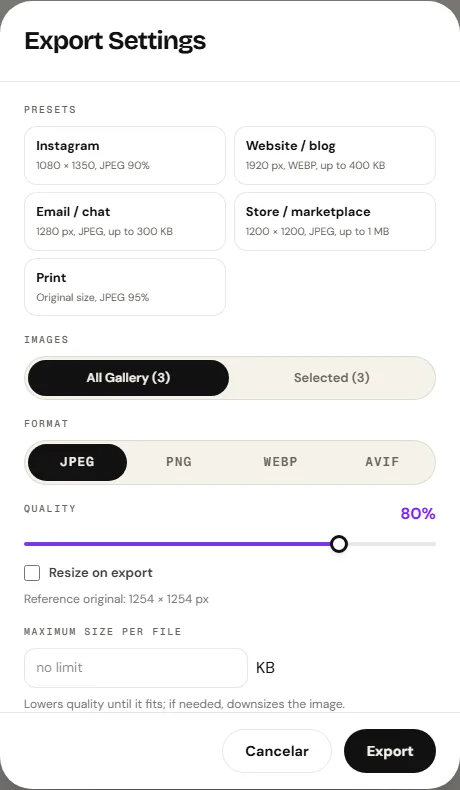
Click export. PhotoEditor.sbs re-encodes a clean image file completely stripped of GPS coordinates, serial numbers, and privacy trails.
Honest Technical Boundary Note
PhotoEditor.sbs removes and purges EXIF, IPTC, and GPS location metadata by re-rendering and encoding image rasters through the native Canvas API in your browser. The editor is not an archival cataloging tool for authoring, injecting, or managing complex XMP/IPTC editorial copyright tags for wire news agencies.
Remove Metadata and Clean Photo Now
Remove Metadata and Clean Photo Now8. Frequently Asked Questions
Frequently asked questions
What is EXIF data in a photograph?
EXIF is a technical specification that automatically embeds camera settings, timestamps, exposure parameters, and GPS location coordinates directly inside the header of digital image files.
How can I tell if my photo contains GPS location data?
On a desktop computer, right-click the file and select 'Properties' (Windows) or 'Get Info' (Mac). If there is a GPS tab or latitude and longitude listed, the photo contains your physical location.
Does removing metadata reduce image sharpness or visual quality?
No. Metadata is stored as plain text instructions in the file container header. Removing EXIF data does not alter pixel resolution or visual image sharpness in any way.
Does PhotoEditor.sbs charge fees for stripping metadata from photos?
No. PhotoEditor.sbs is 100% free with no file limits, no subscriptions, and no watermarks placed on exported images.
Can I disable GPS recording directly inside my smartphone camera settings?
Yes. In iOS or Android camera settings, toggle off 'Location' or 'Save Location' permissions to prevent future snapshots from recording GPS coordinates.
Do WhatsApp and Telegram automatically strip photo metadata?
When shared as a standard compressed chat picture, visible metadata is stripped. However, if you send the image as a 'Document' or 'File', all original EXIF and GPS headers remain intact.
Are my photos transmitted to a remote server during metadata stripping?
No. All sanitization takes place 100% locally in your device's browser memory. No pixels or geographic coordinates are ever transmitted over the internet.
What output file formats are available when saving clean photos?
You can export your sanitized pictures in JPEG, PNG, or in WebP format when the browser supports Canvas WebP encoding.